

Apple Books doesn't have an export button, but your Mac keeps every highlight in two files. Copy those two files to iCloud Drive and pick them in Excerpta: your books, highlights, and notes come over, each highlight on the day you made it. From there, Export Library writes one Markdown file per book, ready for Obsidian, Bear, or Notes.
Guide
How to Export Your Apple Books Highlights
Apple Books keeps your highlights to itself. Here's how to get every one of them out, with your notes, and into one Markdown file per book.
On your Mac
~/Library/Containers/com.apple.iBooksX/Data/Documents
BKLibraryYour books, in BKLibrary….sqlite
AEAnnotationYour highlights, in AEAnnotation….sqlite
In Excerpta
So we beat on, boats against the current, borne back ceaselessly into the past.
The last line. Read it twice.
Exported
---
title: "The Great Gatsby"
authors: ["F. Scott Fitzgerald"]
---

# The Great Gatsby

## Chapter IX

> So we beat on, boats against the current, borne back ceaselessly into the past.

*Captured: 2026-09-14*

**Note:** The last line. Read it twice.
From Books to Excerpta
-
Quit Books, Then Open Its Folder
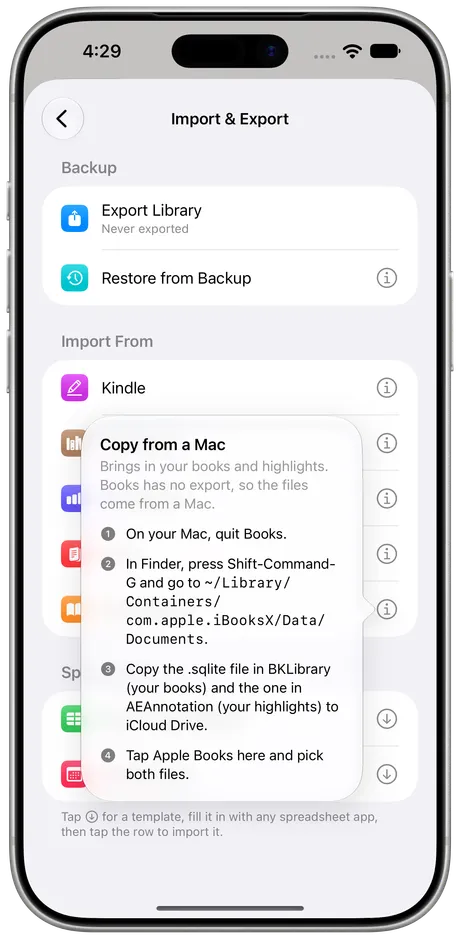
On your Mac, quit Books. In Finder, press Shift-Command-G and go to ~/Library/Containers/com.apple.iBooksX/Data/Documents.
Go to Folder~/Library/Containers/com.apple.iBooksX/Data/Documents -
Copy Two Files to iCloud Drive
The .sqlite file in BKLibrary is your books. The one in AEAnnotation is your highlights and notes. Copy both to iCloud Drive.
BKLibraryYour books, in BKLibrary….sqliteAEAnnotationYour highlights, in AEAnnotation….sqlite -
Pick Them in Excerpta
Go to Settings → Import & Export, tap Apple Books, and pick both files. The books land first, then their highlights.


What Comes Over
Every Highlight
Each one becomes a quote on its book, on the day you made it.
Your Notes
Anything you typed on a highlight comes along with it.
Chapter Titles
When Books knows the chapter. Books you added yourself often don't say.
The Books Themselves
Added to your library, marked as reading or read, with when you started.
Highlight colors don't come over yet. Everything else you'd want to keep does.
Run It Again Whenever You Like
Kept reading in Books? Copy the two files again and import them. Highlights you already have are skipped, so only the new ones come in, and nothing in Apple Books changes: Excerpta reads a copy, never the originals.
Then Take Them Anywhere
Settings → Import & Export → Export Library makes a zip with one Markdown file per book, plus your covers and photos. It opens in Obsidian, Bear, Notes, or anything else that reads plain text, and export stays free whether or not you subscribe.
Other Ways to Do It
- Copy and paste. Open the book, find each highlight, copy it out. Fine for one book, slow for fifty.
- A script. Free scripts on GitHub read the same two files and write Markdown. Great if you're comfortable in Terminal.
Excerpta reads the same files without Terminal, then keeps each highlight with its book, its note, and the day you made it.
Questions
Do I need a Mac?
Yes. The two files Excerpta reads are only reachable on a Mac.
Will my iPhone and iPad highlights be included?
Yes, as long as Books syncs with iCloud, so they show up in Books on your Mac too.
Why quit Books first?
Books keeps writing to these files while it's open. Quitting it first makes sure your copy has everything.
Does it change anything in Apple Books?
No. You're copying the files, and Excerpta only reads the copy.
What happens if I import twice?
Highlights you already have are skipped, so only the new ones come in.
Where can I get Excerpta?
On the App Store, for iPhone and iPad.
Your next favorite quote is waiting to be remembered.
For iPhone and iPad.
Download on the App Store