
Your Kobo keeps every highlight and note in a file called KoboReader.sqlite, in the hidden .kobo folder on the eReader. Plug the Kobo into your iPhone or iPad and pick that file in Excerpta: your books, highlights, and notes come over, including books you added yourself, which Kobo's own export leaves out. From there, Export Library writes one Markdown file per book.
Guide
How to Export Your Kobo Highlights
Kobo's own export only covers books you bought from Kobo. Here's how to get every highlight off the eReader, sideloaded books included.
On your Kobo
KOBOeReader › .kobo
KoboReader.sqliteYour books and highlights, in .kobo
- Kobo
- KoboReader.sqlite
- version
In Excerpta
I am no bird; and no net ensnares me: I am a free human being with an independent will.
Said to his face, too.
Exported
---
title: "Jane Eyre"
authors: ["Charlotte Brontë"]
---

# Jane Eyre

## Chapter XXIII

> I am no bird; and no net ensnares me: I am a free human being with an independent will.

*Captured: 2026-09-20*

**Note:** Said to his face, too.
From Kobo to Excerpta
-
Plug In Your Kobo
Connect it to your iPhone or iPad with a USB cable. It shows up in Files as KOBOeReader.
- KOBOeReader
- .kobo
- KoboReader.sqlite
-
Pick KoboReader.sqlite
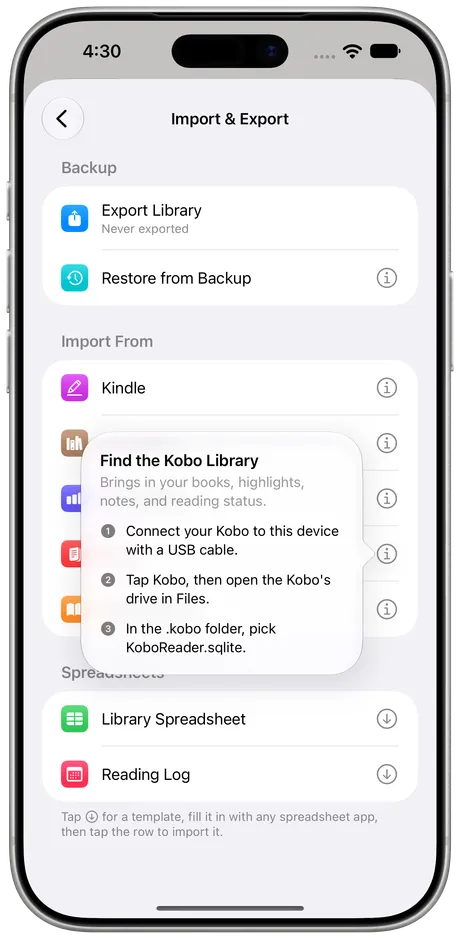
In Excerpta, go to Settings → Import & Export and tap Kobo. Open the Kobo's drive, then the .kobo folder, and pick KoboReader.sqlite.
-
Watch Your Books Fill In
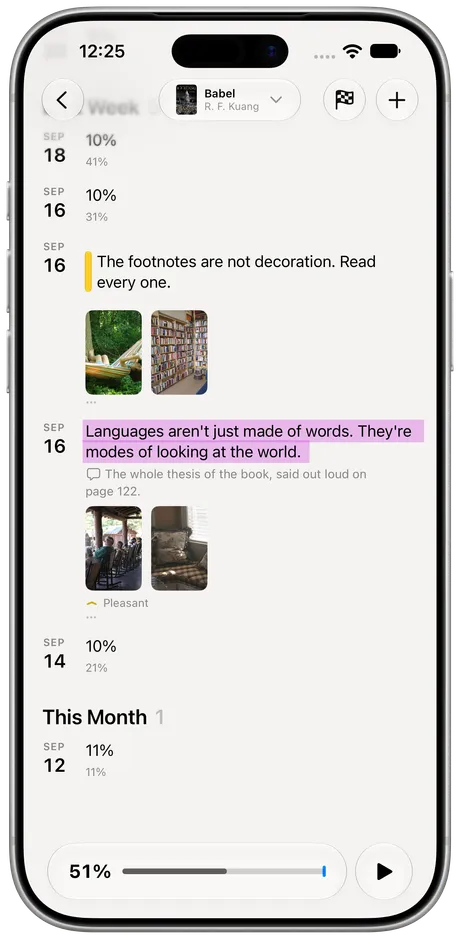
Each book is matched to your library or added, marked as reading or finished, and its highlights land on its timeline.


What Comes Over
Every Highlight
With the chapter it's in, when the book says.
Your Notes
Anything you typed on a passage comes with it.
When You Made It
Each quote lands on the day you highlighted it.
The Books
Including ones you added yourself, marked as reading or finished.
Highlight colors don't come over yet. Everything else you'd want to keep does.
Books You Added Yourself, Too
Kobo's Export Annotations only works for books you bought from Kobo, and only when the publisher allows it. Excerpta reads the Kobo itself, so the ebooks you sideloaded come along with everything else.
Run It Again Whenever You Like
The Kobo keeps every highlight in that one file, so just import it again after your next few books. Highlights you already have are skipped, and only the new ones come in. Nothing on the Kobo changes: Excerpta reads a copy.
Then Into Obsidian
Settings → Import & Export → Export Library makes a zip with one Markdown file per book, each with its highlights, notes, and chapters. Unzip it into your Obsidian vault, or open it in Bear or Notes. Export stays free whether or not you subscribe.
Other Ways to Do It
- Kobo's Export Annotations. On kobo.com, under My Books. Handy for store-bought books, and nothing else.
- A converter. Calibre plugins and web tools read the same file and write Markdown or CSV. Quick, but they stop at the file.
Excerpta reads the same file, then keeps each highlight with its book, its note, and everything you read after it.
Questions
Where is KoboReader.sqlite?
On the Kobo, in a hidden folder called .kobo at the top of its drive.
Does it include books I sideloaded?
Yes. Anything you've highlighted on the Kobo comes over, wherever the book came from.
Does it change anything on my Kobo?
No. Excerpta reads a copy of the file and never writes to the Kobo.
Do I need a cable?
It's the easiest way. You can also copy the file to iCloud Drive from a computer and pick it from there.
What happens if I import twice?
Highlights you already have are skipped, so only the new ones come in.
Where can I get Excerpta?
On the App Store, for iPhone and iPad.
Your next favorite quote is waiting to be remembered.
For iPhone and iPad.
Download on the App Store